Configure your AI teammate from a GitHub repository.
Skills, standing instructions, agents, MCP servers, tool environments, apps and API connections are all just files. Keep them in a repository, connect it to Cengrid, and choose which teams get what. Here’s the layout, templates you can copy, and how a change goes from pull request to your whole organisation.
Why use a repository
Most AI tools are configured by clicking through settings. That’s fine for one person. For a company it leaves questions nobody can answer: who changed the support agent’s instructions last Tuesday, why did it stop using the finance tools, and can we go back to how it worked last month?
A Git repository already answers them. When Cengrid reads its capabilities from GitHub, every change to their files comes with an author, a diff and a history, and goes through whatever review your repository requires.
Reviewed like code. Changes arrive as pull requests, so your GitHub review rules apply to them. Cengrid takes whatever is on the branch, tag or commit you connected when an administrator presses Re-sync.
Rolled out by scope. One repository can serve the whole organisation and each team. You choose, item by item, who gets what.
Nothing happens by surprise. Connecting a repository only makes its items available. Nothing is switched on until an administrator adds it, and importing only reads files.
What goes in the repository
A repository holds one or more plugins. A plugin is a folder with a small manifest, plugin.json, plus any of the capabilities below. Only the manifest is required, so you can start with a single skill.
Capability
File
What it gives the agent
Skills
skills/<name>/SKILL.md
A procedure the agent follows when a task calls for it, with optional reference files.
Instructions
instructions/<name>/INSTRUCTIONS.md
Standing guidance, applied on every turn in the scope that adds it.
Agents
agents/<name>/AGENT.md
A named agent with its own model and rules.
MCP servers
mcp.json
Tools from a remote MCP server over HTTP.
API connections
connections.json
A REST API the agent can call. The secret is entered in the console, never stored in the repository.
Environments
environments/<name>/
Command-line tools installed on the conversation’s computer.
Apps
apps/<name>/app.json
A small internal web app, deployed for the organisation or a team.
A repository can hold one plugin at its root or several in subdirectories. Connect each directory on its own, or list them all in a marketplace.json and link the repository once. This layout is a good place to start.
Connect GitHub once. In Connections, enable your organisation’s GitHub connection with a token that can read the repository. A read-only token is enough. Every administrator shares this one connection, and the token is never copied into plugin records.
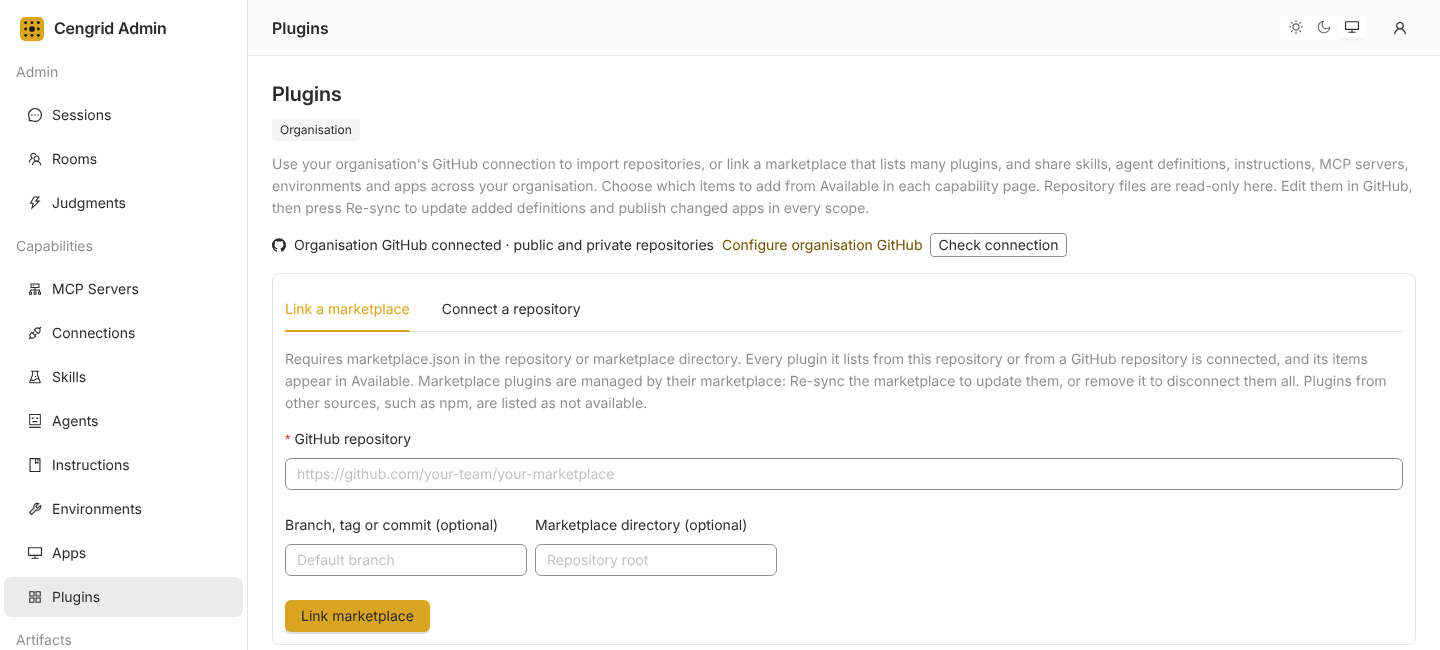
Connect the repository. Open Plugins and choose Connect a repository. Enter owner/repository, and optionally a branch, tag or commit and a plugin directory. Connecting only reads the files, and nothing runs yet.
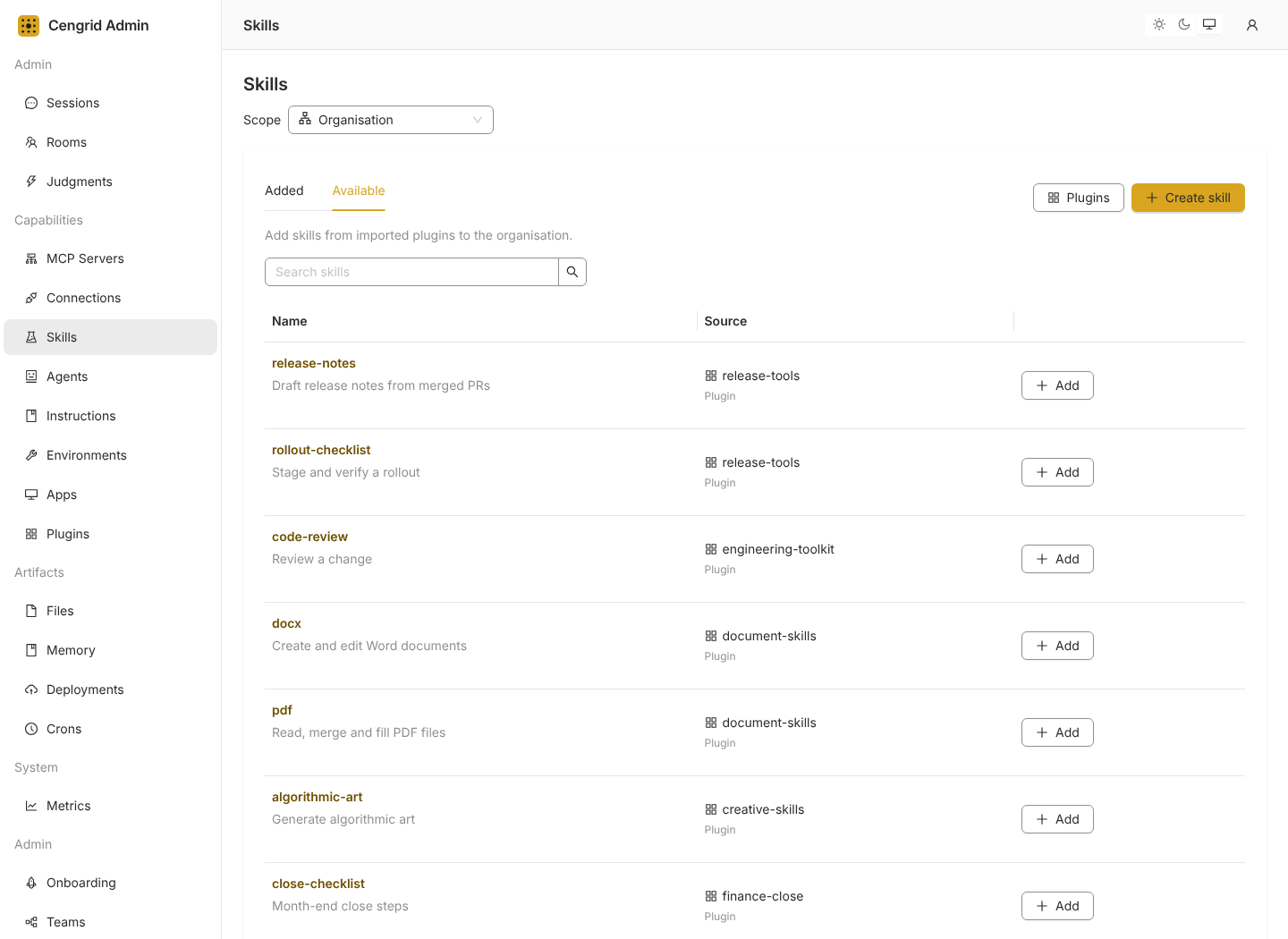
Choose what to add. Everything in the repository appears under Available on its capability page: Skills, Agents, Instructions, MCP Servers, Environments and Apps. Add each item to the organisation or to a team. Nothing is switched on until you do. API connections appear under Connections instead, where you configure each one before it can be used.
Keep it current. Edit the files in GitHub and merge. Then press Re-sync on the Plugins page to apply the change everywhere the plugin’s items have been added.
Scroll sideways to see the whole screen.Plugins in the admin console. Link a marketplace, or connect a single repository. Sample data.Open full size
Scroll sideways to see the whole screen.Items from connected repositories appear under Available on each capability page. Add one to the organisation or a team. Sample data.Open full size
Templates to copy
Each template below is a complete file in the format Cengrid’s importer expects. Copy the ones you need into a repository at the path shown, then rename the examples to suit your team.
The manifest
The only required file. It names the plugin in the console. An empty plugin with just a manifest is valid.
plugin.json
{
  "name": "team-toolkit",
  "description": "Shared skills and guidance for our team",
  "version": "1.0.0"
}
A skill
A skill is a procedure the agent reads when a task calls for it. Put the steps in SKILL.md, and anything the skill needs to refer to in a references folder beside it. Keep each skill to one job, and write the description so a colleague could tell when to use it.
skills/release-notes/SKILL.md
---
name: release-notes
description: Draft release notes from the changes merged since the last release.
---

# Release notes

1. List the changes merged since the last release.
2. Group them by what a customer would notice, not by repository.
3. Write one plain sentence for each change. Put breaking changes first.
4. End with anything that needs a manual step, such as a migration or a setting.

Follow the tone in `references/style.md`. If you can't find the last release, say so and ask which tag to start from.
skills/release-notes/references/style.md
Lead with the benefit. Use the customer's words, not ours. Keep each line under 20 words.
Standing instructions
Instructions are guidance the agent follows on every turn, such as tone, house style or release practices. Add one at the organisation to apply it everywhere, or to a single team.
instructions/company-voice/INSTRUCTIONS.md
---
name: company-voice
description: Use plain language and lead with the outcome.
---

Use plain language. Lead with the outcome, keep replies concise, and make the next step clear.
When you're unsure, say what you checked and what you couldn't.
The full text of every added instruction goes into every turn, so keep them short. For guidance that only matters sometimes, use a skill.
An agent
An agent is a named role with its own model and rules, and Cengrid runs it as a step of a task. The frontmatter picks the model: name a provider and model your deployment offers. Temperature is optional.
agents/support-triager/AGENT.md
---
name: support-triager
description: Sorts new support requests by urgency and owner.
model:
  provider: openai
  name: gpt-4o
  temperature: 0.2
---

# Role

You triage new support requests for the support team.

# Rules

- Mark a request urgent only when a customer is blocked or data is at risk.
- Name the team that should own it, and say why in one sentence.
- Never promise a fix date.
An MCP server
MCP servers give the agent tools from other systems. Cengrid supports remote servers over HTTP(S). If a server needs a bearer token, add an Authorization header with a placeholder such as Bearer replace-in-console. Cengrid discards the value on import and asks for the real token when an administrator adds the server.
mcp.json
{
  "mcpServers": {
    "helpdesk": {
      "url": "https://mcp.example.com/helpdesk",
      "description": "Search and update support tickets"
    }
  }
}
An API connection
For a plain REST API, declare the endpoint and how it authenticates. The template carries no secret. An administrator enters the token when they configure the connection, and can narrow it to a more specific path. Connections are read-only unless you set readOnly to false.
An environment installs the command-line tools a conversation’s computer needs, so the agent doesn’t have to work out how to get them. List the tools in mise.toml. If you need more than that, add a setup.sh beside it.
environments/toolchain/environment.json
{
  "description": "Node and the AWS CLI for deploy checks"
}
environments/toolchain/mise.toml
[tools]
node = "24"
aws-cli = "2"
An app
An app is a small internal web app, deployed for the organisation or a team. A static app is prebuilt files: point directory at your build output, which must contain an index.html. Variables declared in app.json become a form when an administrator adds the app, so the organisation and each team can set their own values. Docker apps work too, with a Dockerfile in place of prebuilt files.
apps/report/app.json
{
  "name": "report",
  "title": "Report dashboard",
  "description": "Browse reports from your reports API.",
  "type": "static",
  "directory": "public",
  "variables": [
    {
      "name": "API_BASE_URL",
      "description": "Base URL of your reports API",
      "required": true,
      "regex": "^https://[^\\s]+$"
    }
  ]
}
A marketplace lets one repository serve the whole company. It’s a marketplace.json that lists plugins, each in its own folder or pulled from another repository at a version you choose. Link it once and every plugin’s items appear under Available.
We keep a public one you can link today: shelf-b2b/cengrid-plugin-demo. It has six plugins, and between them they cover agents, instructions, skills, environments and API connections.
Plugin
What it adds
agent-team
Four agents, each on a different model.
agent-first
One instruction that routes work to those agents.
api-connections
Six REST API connection definitions for Expo, Vercel and Sentry.
dev-tools
Three environments: Flutter build tools, Node 24 and the Firebase CLI.
kernel-browser
Browser testing: a skill, an agent, an instruction, an API connection and a CLI environment.
web-design
Two web design skills with 54 reference templates.
Link it and look around
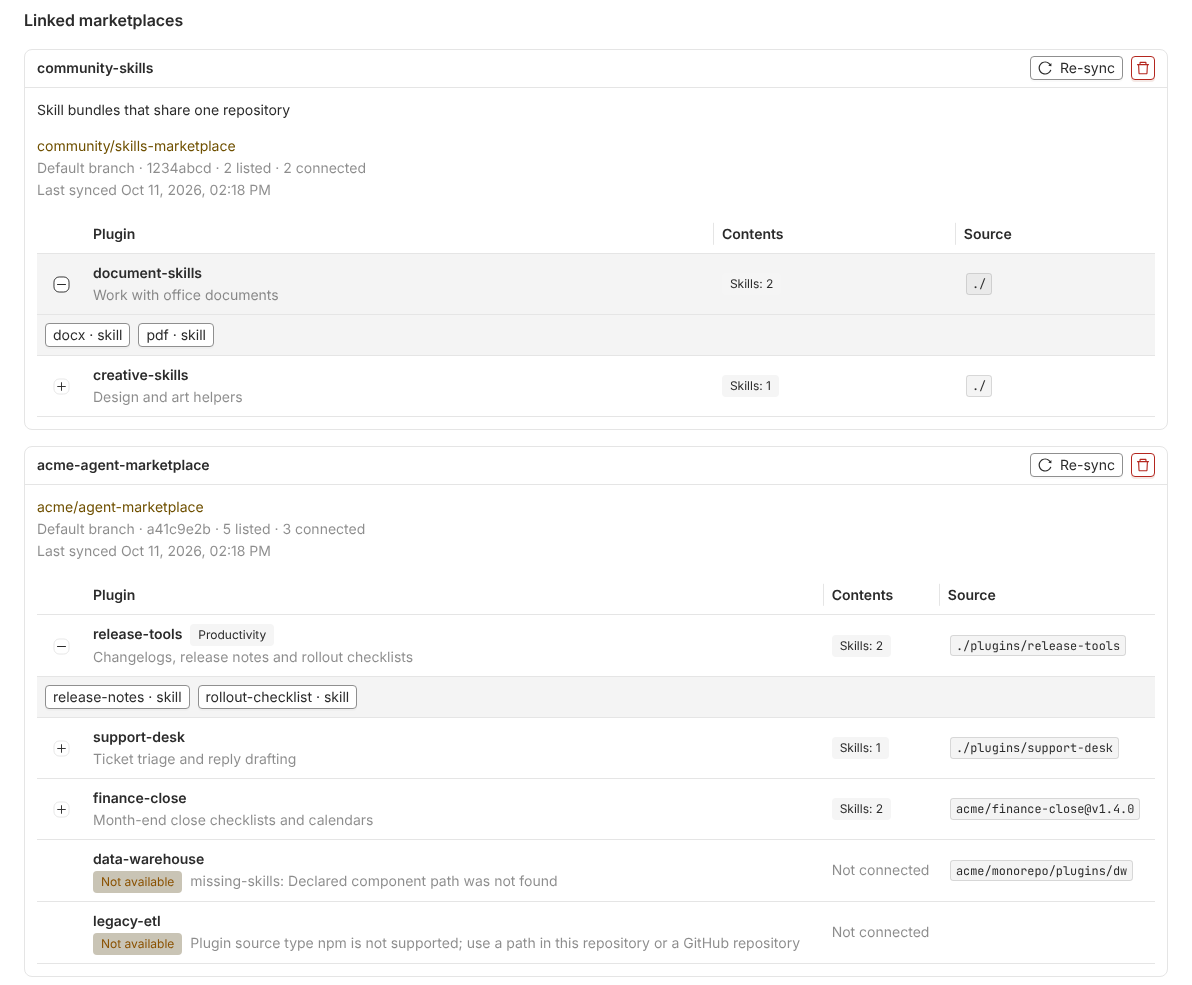
In the admin console, open Plugins, choose Link a marketplace, and enter shelf-b2b/cengrid-plugin-demo. Leave the branch and directory empty, because the marketplace file is at the repository root. Each plugin’s items appear under Available, and nothing is added anywhere until you choose them.
Add only what you need. agent-team and kernel-browser include agents that run on OpenRouter models, so they connect where your deployment has those models. The API connections take tokens you enter yourself, and the browser plugin runs on your own Kernel account.
Scroll sideways to see the whole screen.Linked marketplaces, with each plugin’s contents and source. An entry that can’t be loaded is marked Not available with the reason, and doesn’t stop the others. Sample data, not the demo marketplace.Open full size
The marketplace file
Here is how the demo is laid out, and the complete file that lists its plugins.
{
  "name": "cengrid-plugin-demo",
  "description": "Demo marketplace with optional agents, instructions, development environments, REST API connections, browser QA and web design plugins.",
  "plugins": [
    {
      "name": "agent-team",
      "source": "./plugins/agent-team",
      "description": "Architect, designer, coder and code-reviewer agents, each on a different model.",
      "category": "Agents"
    },
    {
      "name": "agent-first",
      "source": "./plugins/agent-first",
      "description": "Instruction that routes any work matching a defined agent through the pipeline tool.",
      "category": "Instructions"
    },
    {
      "name": "api-connections",
      "source": "./plugins/api-connections",
      "description": "Secret-free REST API definitions for Expo workflows, Vercel deployments and Sentry diagnostics.",
      "category": "Connections"
    },
    {
      "name": "dev-tools",
      "source": "./plugins/dev-tools",
      "description": "Environments for Flutter build tools, Node 24 and the Firebase CLI.",
      "category": "Environments"
    },
    {
      "name": "kernel-browser",
      "source": "./plugins/kernel-browser",
      "description": "Optional Kernel browser QA, team API connection, focused agent and CLI environment.",
      "category": "Browser QA"
    },
    {
      "name": "web-design",
      "source": "./plugins/web-design",
      "description": "Optional taste-skill design playbook and popular-web-designs reference catalog, independent of browser providers.",
      "category": "Design"
    }
  ]
}
A plugin doesn’t have to live in the marketplace repository. An entry can pull one from another GitHub repository. Use ref for a branch or tag, or sha with a full 40-character lowercase commit SHA for an exact version that never moves.
A marketplace entry that pulls from another repository
Connecting makes everything available. Rollout is a separate decision, made per item, so one marketplace can look very different from team to team. Here is one way to roll the demo out.
Plugin
Add it to
What that means
dev-tools
Engineering team
Node, Flutter and Firebase tools on the Engineering team’s computers.
agent-team and agent-first
Engineering team
Four agents, and the instruction that sends matching work to them.
api-connections
Engineering team
Expo, Vercel and Sentry connections, read-only unless you add the optional write ones.
kernel-browser
QA team
Browser testing through the QA team’s own Kernel connection.
web-design
Design team
The design skills and reference templates, in Design conversations only.
Skills, agents, instructions and environments added at the organisation are inherited by every team. Organisation administrators manage this in the console: they can lock one so every team keeps it, or remove an unlocked one for a single team without affecting anyone else. The names of skills, agents, instructions and environments are used once along the chain, so a team can’t quietly redefine one the organisation already provides. Apps work differently: the organisation and each team run their own copies. A team can override an MCP server or API connection by adding one with the same ID.
Ship changes with a pull request
Change a file. Edit it on a branch and open a pull request. Review it the way you review code.
Merge, then Re-sync. Cengrid fetches GitHub only when an administrator asks, so a merge changes nothing until someone presses Re-sync. New files appear under Available. Edited files update everywhere they’ve been added. Deleted files remove what they defined.
Choices survive. Re-sync keeps each scope’s on or off settings. Saved credentials carry over while a server or connection’s endpoint and authentication stay the same. If they change, an administrator enters them again.
A bad commit is refused. If a plugin has an invalid file, its Re-sync is rejected before it changes what’s already added. In a marketplace, the other plugins still sync.
Roll back with a revert. Revert the commit and Re-sync. To hold a plugin at a known version, pin it to a tag or commit.
The repository is the source of truth. Items imported from GitHub are read-only in the console. To change one, change the file.
Safe by default
Reading isn’t running. Importing a repository only reads its files. It doesn’t run scripts, hooks or package installs. Code runs later only if an administrator adds an item that contains it, such as an environment’s setup script or a Docker app.
Secrets stay out of Git. Tokens and API keys are entered in the console, not the repository. An API connection definition that contains a token is rejected, an MCP bearer value is discarded on import, and .env files are never imported. Saved connection secrets are encrypted and never shown again. Skill and instruction text is imported as written, so keep keys out of it.
Nothing turns on by itself. Connecting only makes items available. An administrator adds each one to the organisation or a team.
Restrictions aren’t dropped. An agent with a tool list, or a skill with allowed-tools, is shown as unavailable with the reason rather than running without the restriction. So is an MCP server that needs a local or SSE connection.
Administrators only. Organisation administrators connect repositories, through one shared GitHub connection.
No. One repository with several plugins keeps everything in one place, and you add each plugin to the teams that need it. Separate repositories work too if a team wants its own review rules. Connect as many as you like.
Can the repository be private?
Yes. Cengrid reads it with your organisation’s GitHub connection, which can reach public and private repositories. A read-only token is enough.
Can I still create skills inside Cengrid?
Yes. Custom skills and agents can be created in the console alongside the ones from GitHub. Imported definitions stay read-only, so the repository is the only place to change them.
What if I already have plugins for another tool?
Cengrid reads plugin manifests at .claude-plugin/plugin.json and .codex-plugin/plugin.json, and the parts that overlap: skills, agents and remote MCP servers. Hooks, slash commands, local MCP servers and tool restrictions don’t run, and Cengrid flags them. An agent that names a short model alias such as sonnet has to be changed first, or the whole plugin is rejected.